
Keyboard shortcuts
The complete shortcut reference for macOS, Windows, and Linux, from compile and SyncTeX to code intelligence and the slash menu.
Oleafly is comfortable to drive entirely from the keyboard. Press ⌘/ (Ctrl+/) inside the app anytime for a searchable version of this list.
macOS shortcuts are listed first; the Windows/Linux equivalent swaps ⌘ for Ctrl.
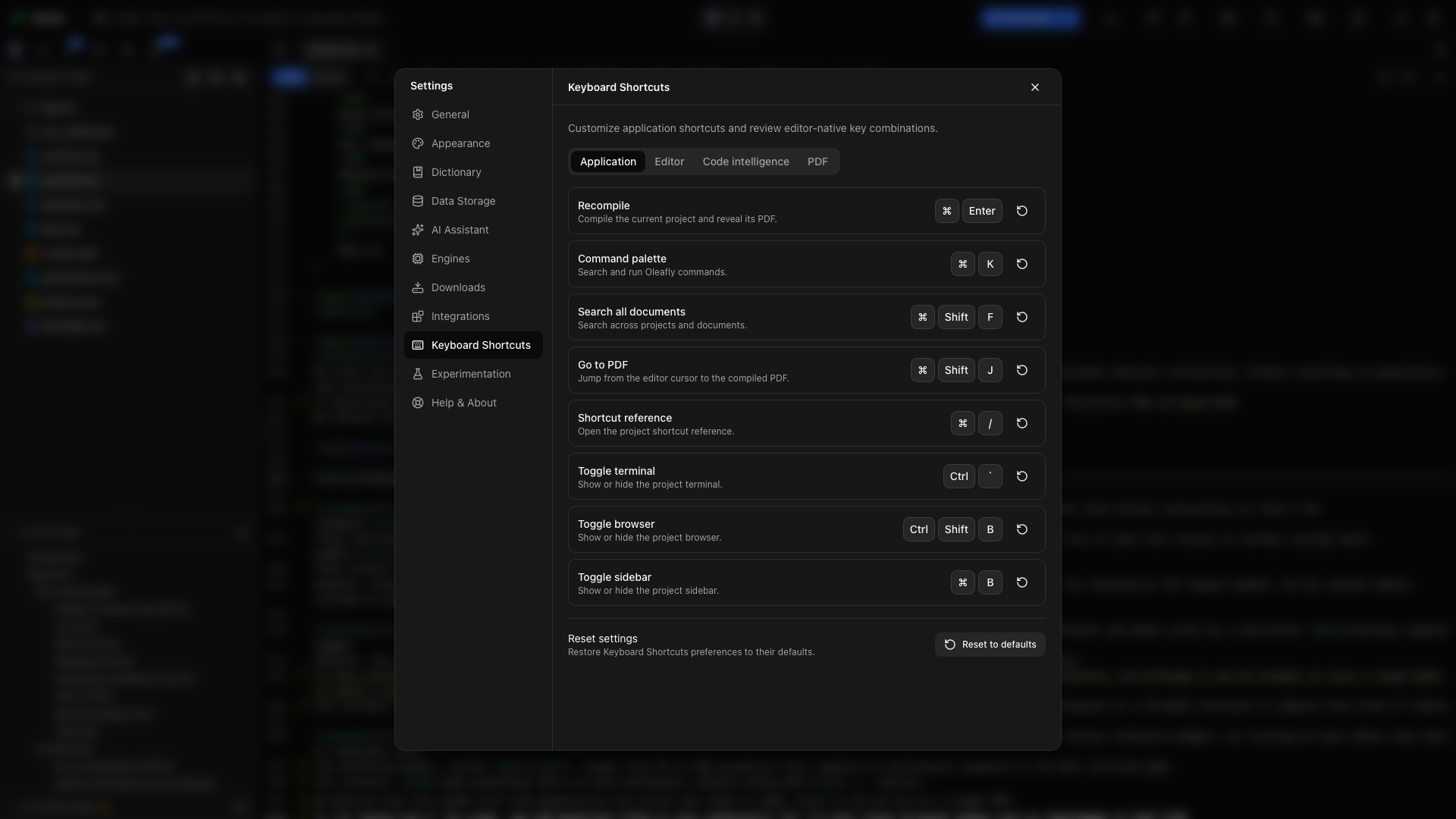
Customize application shortcuts
Section titled “Customize application shortcuts”Open Settings → Keyboard Shortcuts to change Recompile, Command palette, Search all documents, Go to PDF, or Shortcut reference. Select the displayed keys, press the new combination, and click elsewhere to cancel recording. Reset controls restore one binding or all application bindings. Custom bindings must include ⌘ on macOS or Ctrl on Windows and Linux. Oleafly rejects standalone keys and combinations already used by the editor.
Global
Section titled “Global”| macOS | Windows / Linux | Action |
|---|---|---|
| ⌘K | Ctrl+K | Command palette |
| ⌘⇧F | Ctrl+Shift+F | Search omnibar: projects, all documents, / commands |
| ⌘↵ | Ctrl+Enter | Recompile |
| ⌘⇧J | Ctrl+Shift+J | Jump to PDF (SyncTeX forward) |
| ⌘/ | Ctrl+/ | Keyboard shortcuts reference |
Editor
Section titled “Editor”| macOS | Windows / Linux | Action |
|---|---|---|
| ⌘F | Ctrl+F | Find & replace |
| ⌘B | Ctrl+B | Bold (\textbf{}) |
| ⌘I | Ctrl+I | Italic (\textit{}) |
| ⌘Z / ⌘⇧Z | Ctrl+Z / Ctrl+Shift+Z | Undo / redo |
| ⌘L | Ctrl+L | Ask AI to edit the selection (inline edit) |
| Ctrl+Space | Ctrl+Space | Trigger autocomplete |
/ | / | Slash insert menu (/figure, /table, /section, …) |
| Tab | Tab | Accept suggestion, otherwise indent |
| Alt-drag | Alt-drag | Rectangular (column) selection |
| Gutter arrow | Gutter arrow | Fold / unfold an environment or section |
In the find widget: Enter next match, Shift+Enter previous, Esc close.
Code intelligence
Section titled “Code intelligence”| macOS | Windows / Linux | Action |
|---|---|---|
| F12 or ⌘-click | F12 or Ctrl-click | Go to definition (across files) |
| ⇧F12 | Shift+F12 | Find references (opens the References panel) |
| F2 | F2 | Rename symbol project-wide |
| ⌘-hover | Ctrl-hover | Underline symbols as clickable links |
PDF preview
Section titled “PDF preview”| macOS | Windows / Linux | Action |
|---|---|---|
| ⌘-click on the PDF | Ctrl-click on the PDF | Jump to source (SyncTeX inverse) |
| Pinch on trackpad | Ctrl+scroll | Zoom (40% to 400%) |
| Esc | Esc | Exit fullscreen preview |
Inline AI review
Section titled “Inline AI review”While an inline AI edit is showing its diff: Enter accepts, Esc rejects.
Layout
Section titled “Layout”The view is controlled from the toolbar rather than shortcuts: the Source / Split / PDF segmented control switches layouts, the divider drags to resize, and clicking the active rail tab collapses the sidebar.
Vim mode
Section titled “Vim mode”Toggle Vim mode in Settings, General (or via the ⌘K palette) for the full Vim keybinding set (hjkl, i, :w, dd, ciw, visual mode) alongside everything above. See The editor.
Where else commands live
Section titled “Where else commands live”Almost everything with a shortcut also lives somewhere clickable: the editor toolbar, the right-click menu, the ⌘K command palette (fuzzy-searches every action: recompile, word count, add citation, insert figure, toggle theme, and more), and the ⌘⇧F omnibar with its / scopes (/create, /projects, /docs, /theme, /settings).